
Frequently Asked Questions: CMS 588 Form
What Is the CMS 588 Form?
The CMS 588 form — officially titled the “Electronic Funds Transfer (EFT) Authorization Agreement” — is the Medicare document that authorizes your Medicare Administrative Contractor (MAC) to deposit Medicare reimbursements directly into your designated business bank account.
Before EFT became mandatory, Medicare providers received paper checks that had to be manually deposited. Today, EFT is required for all Medicare-enrolled providers — individual physicians, group practices, hospitals, and non-physician practitioners alike. Without an active CMS 588 on file, Medicare will not release payment to your practice.
The form is short — one page, five sections — but errors in any section can delay your payments by weeks. This guide walks through every field in detail so you can complete it correctly the first time. You can download the official CMS 588 from CMS.gov.
When Do You Need to Submit the CMS 588?
There are three distinct situations that require submitting a CMS 588:
New Medicare Enrollment
If you are enrolling in Medicare for the first time, submit the CMS 588 alongside or immediately after your CMS 855i application. No EFT on file = no payments after approval.
Change Existing EFT
Changing banks, switching account types, or updating your account number all require a new CMS 588. Do not close your old account until the MAC confirms the new EFT is active.
Reactivate Lapsed EFT
If your EFT was terminated due to incorrect banking info, a closed account, or a rejected transaction, a new CMS 588 with valid banking details is required to reactivate direct deposit.

EFT vs. Paper Check: Why Medicare Requires Electronic Payment
| Factor | EFT (CMS 588) | Paper Check |
|---|---|---|
| Required by Medicare? | Yes — mandatory | No longer available |
| Payment speed | 1–2 business days after processing | 7–14 days by mail |
| Payment traceability | Full electronic audit trail | Manual reconciliation required |
| Risk of lost payment | Minimal | High (lost/stolen mail) |
| Bank reconciliation | Automatic with ERA (835 files) | Manual matching required |
| Setup required | CMS 588 + voided check | N/A (discontinued) |

How to Fill Out the CMS 588 Medicare EFT Form: Step by Step
The CMS 588 has five numbered sections. Here is exactly what goes in each field:
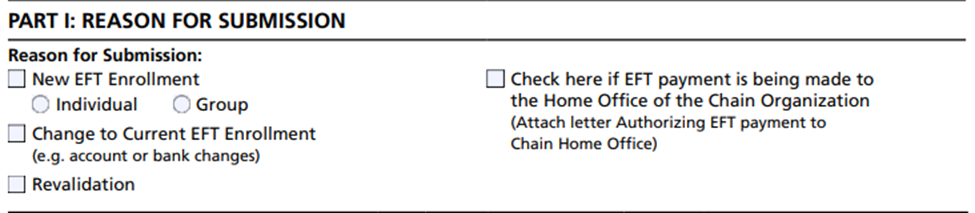
Section 1 — Reason for Submission
Check exactly one box indicating why you are submitting the form:
- New EFT enrollment — first time setting up EFT for this NPI/PTAN combination
- Change existing EFT — updating bank account, routing number, or account type
- Reactivate EFT — reinstating a previously terminated EFT authorization
Only one box may be checked. If you are simultaneously enrolling in Medicare for the first time, check “New EFT enrollment.”

Section 2 — Account Holder Information
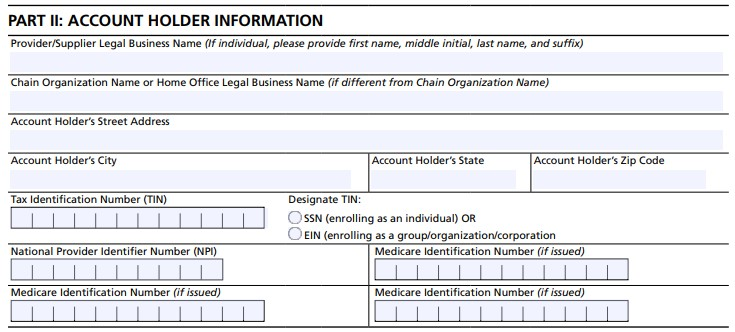
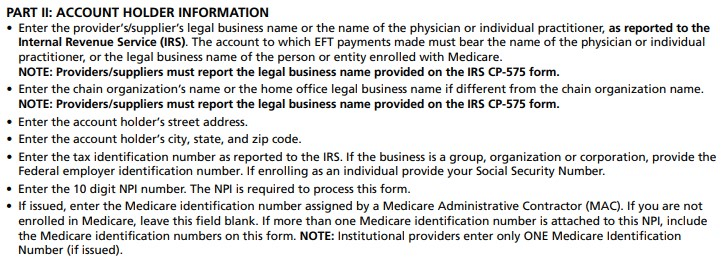
Enter your practice information exactly as it appears in your Medicare enrollment records:
- Provider/Supplier name — legal entity name as registered with CMS (must match your EIN confirmation letter)
- Business address — practice mailing address on file with your MAC
- NPI — your active National Provider Identifier (Type 1 for individuals, Type 2 for groups)
- Medicare ID (PTAN) — up to 3 PTANs if one NPI is linked to multiple Medicare IDs
- TIN/EIN — your practice’s federal Tax Identification Number
⚠️ Every name and number here must match your Medicare enrollment records exactly. Any discrepancy triggers a manual review and delays processing.
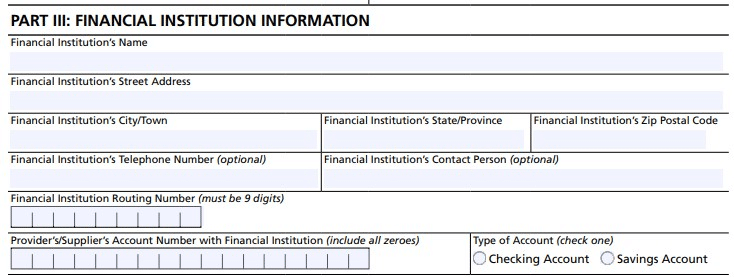
Section 3 — Financial Institution Information
Enter your bank account details precisely:
- Bank name and address — full legal name of your financial institution and branch address
- ABA routing number — the 9-digit routing number from the bottom-left of your check. Use the ABA routing number, not the wire transfer routing number (they are different)
- Account number — your checking or savings account number
- Account type — check “Checking” or “Savings” — most practices use a checking account
Attach a voided check or an official bank letter confirming your routing and account numbers. The bank letter must include the bank officer’s name and signature. Deposit slips are not accepted.
Section 4 — Contact Person
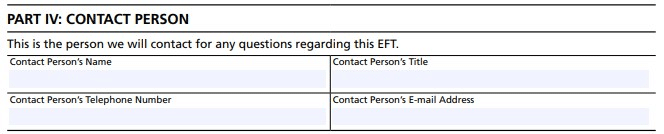
Provide contact information for the person who can answer questions about this EFT request:
- Full name and title of the contact person
- Daytime phone number (direct line preferred)
- Email address (optional but recommended for faster MAC communication)
This person does not need to be the practice owner, but must be reachable during business hours if the MAC has questions about your banking information.
Section 5 — Authorization Signature
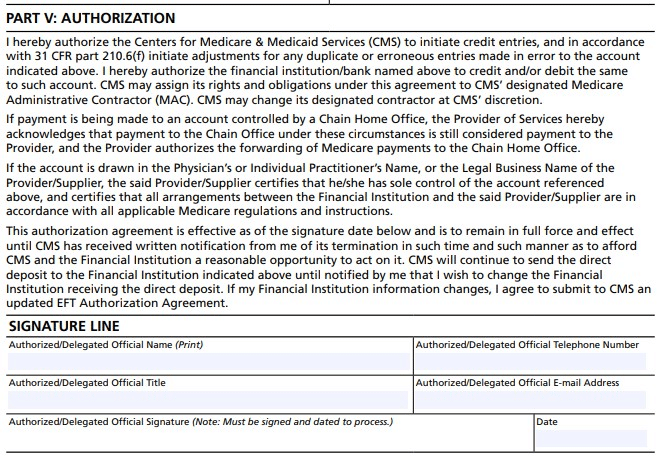
The form must be signed by an authorized individual:
- Who can sign: the individual provider, a practice owner, a managing partner, a CEO, or another authorized officer of the practice
- Signature must be original — electronic signatures are not accepted on the paper form
- Title and date — print your title and today’s date next to your signature
The signatory is legally authorizing Medicare to deposit payments to the account listed. Ensure the information is accurate before signing — submitting incorrect banking information is a compliance issue.
Documents Needed to Submit the CMS 588
📋 CMS 588 Submission Checklist
Where to Submit the CMS 588 Form: Your MAC by State
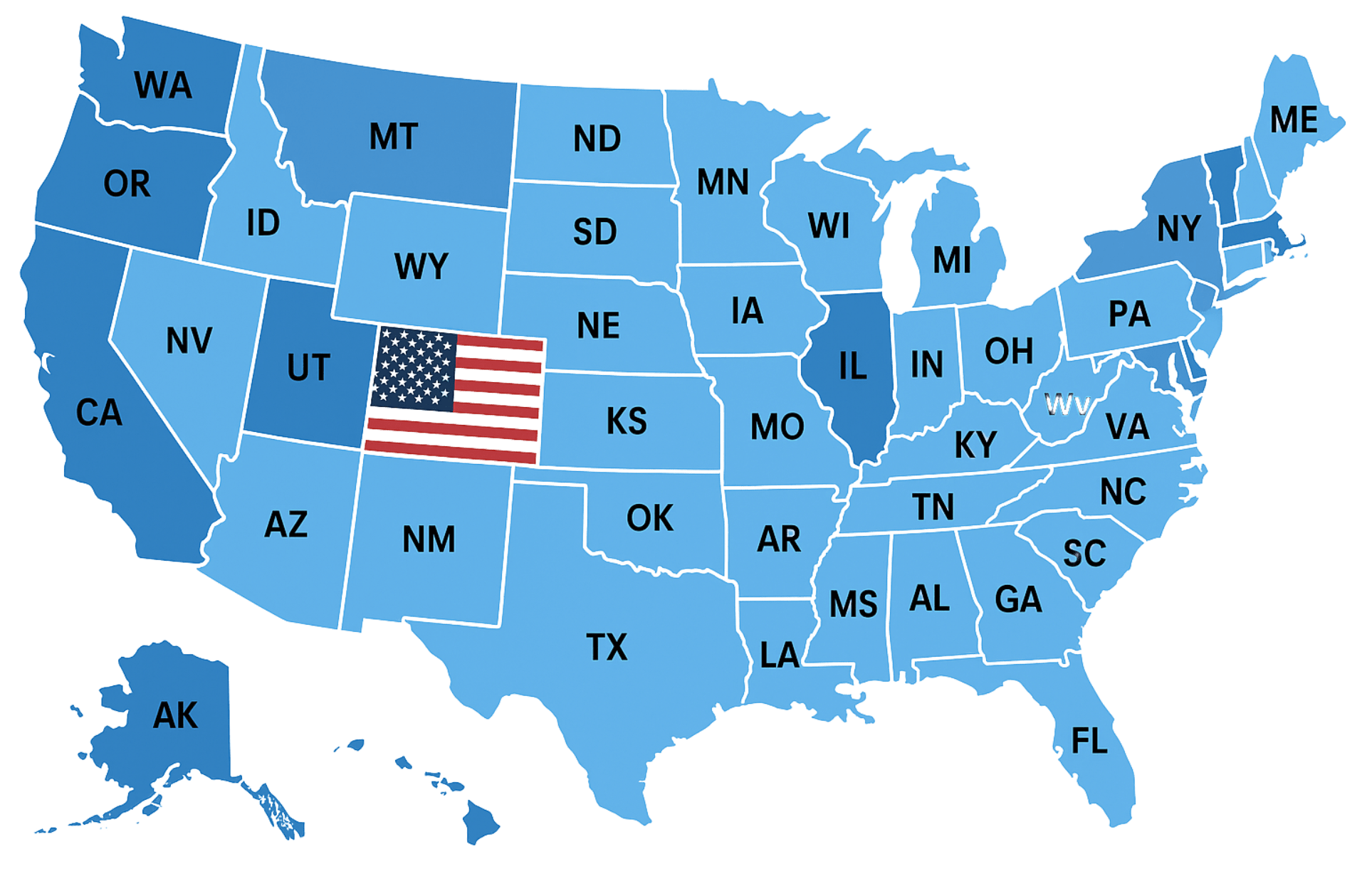
Submit the CMS 588 directly to the Medicare Administrative Contractor (MAC) that processes claims for your state. There are 12 MACs covering different geographic jurisdictions. If you practice in states covered by different MACs, you must submit a separate CMS 588 to each one.
Jurisdiction E — CGS Administrators
Kentucky, Ohio
Jurisdiction F — CGS Administrators
Connecticut, New York, Maine, Massachusetts, New Hampshire, Rhode Island, Vermont
Jurisdiction H — Novitas Solutions
Arkansas, Louisiana, Mississippi, New Mexico, Oklahoma, Texas, Colorado
Jurisdiction J — Novitas Solutions
Delaware, Maryland, New Jersey, Pennsylvania, DC
Jurisdiction L — Palmetto GBA
North Carolina, South Carolina, Virginia, West Virginia
Jurisdiction M — Palmetto GBA
Alabama, Georgia, Tennessee
Jurisdiction N — First Coast Service Options
Florida, Puerto Rico, US Virgin Islands
Jurisdiction 5 — Wisconsin Physicians Service
Iowa, Kansas, Missouri, Nebraska
Jurisdiction 6 — National Government Services
Illinois, Minnesota, Wisconsin
Jurisdiction 8 — Wisconsin Physicians Service
Indiana, Michigan
Jurisdiction 15 — CGS Administrators
Kentucky, Ohio (Part B)
Jurisdictions 1–4 — Noridian Healthcare Solutions
Alaska, Arizona, California, Hawaii, Idaho, Montana, Nevada, North Dakota, Oregon, South Dakota, Utah, Washington, Wyoming, and US territories
How Long Does Medicare EFT Setup Take?
Submit your CMS 588 as early as possible — ideally on the same day as your Medicare enrollment application. See our full credentialing and enrollment timeline guide for parallel Medicare processes.
Common CMS 588 Mistakes That Delay Medicare Payments
Wrong Routing Number
Using the wire transfer routing number instead of the ABA/ACH routing number is the #1 error. The ABA routing number is the 9-digit number on the bottom-left of your check. Wire routing numbers are different and will cause rejected deposits.
Name Mismatch
The account holder name on the CMS 588 must exactly match the legal entity name in your Medicare enrollment record. Even a minor difference (“LLC” vs “L.L.C.” or an abbreviated name) can trigger a manual hold.
Using a Deposit Slip
Deposit slips do not carry the correct ABA routing number. Always use a voided check from the same account or an official bank letter. MAC reviewers are trained to reject deposit slips on sight.
Wrong MAC
Sending your CMS 588 to the wrong MAC means it will sit unprocessed. The MAC receiving it will typically not forward it. Confirm your MAC jurisdiction on CMS.gov before submitting.
Missing PTAN
If you have not yet received your PTAN because enrollment is still pending, note this on the form and submit once your PTAN is issued. A missing PTAN field without explanation delays processing.
Closing Old Account Too Early
If you are changing banks, do not close the old account until the MAC confirms the new EFT is active. Medicare payments processed during the transition may post to the old account — if it is closed, the payment is returned and must be re-issued.
CMS 588 and Medicare Enrollment: How They Connect
The CMS 588 is not part of the main Medicare enrollment application (CMS 855i) — it is a separate, standalone form. However, the two are closely linked: Medicare will not release payments to a newly enrolled provider until both the enrollment application is approved and EFT is established via CMS 588.
For providers managing the full Medicare enrollment process, our Medicare credentialing guide covers the complete picture — NPI registration, PECOS enrollment, MAC assignment, and credentialing timelines. You can also check the CMS PECOS system to verify your current enrollment status and EFT settings.
For practices managing multiple payer enrollments simultaneously, our credentialing timeline guide provides realistic timelines for Medicare, Medicaid, and commercial payer enrollment running in parallel.
Need Help With Medicare Enrollment or EFT Setup?
We handle Medicare enrollment, CMS 588 submission, and MAC follow-up for providers across all 50 states — so you get paid faster without the paperwork headache.