
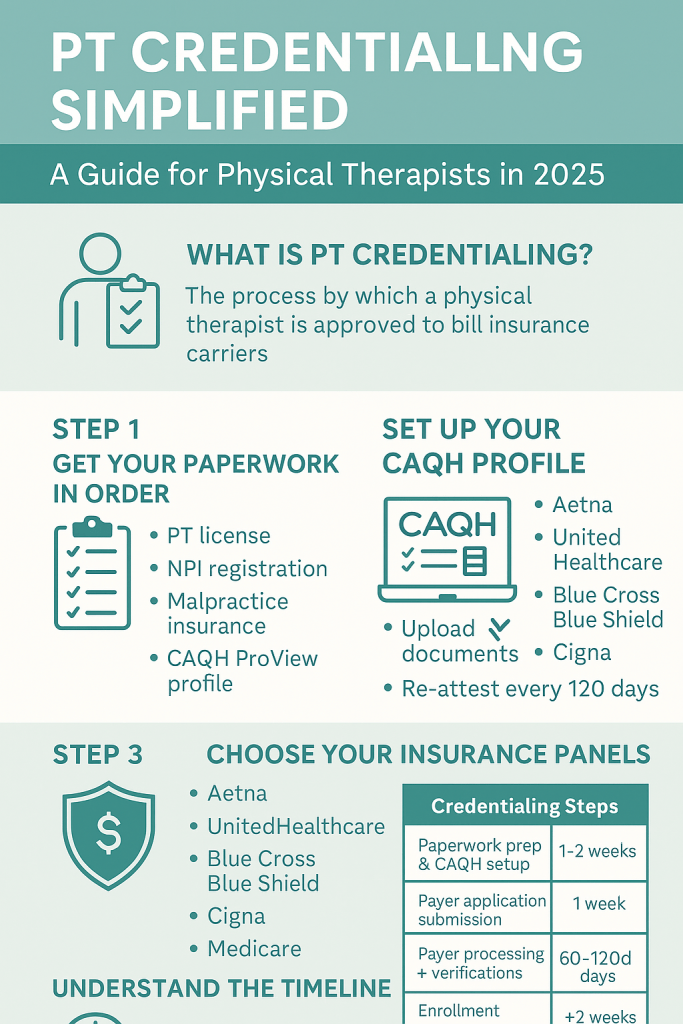
PT credentialing guide
A practical, step-by-step playbook for Physical Therapists and PT clinic owners: from NPI & CAQH to Medicare PECOS, payer contracting, timelines, re-credentialing, and compliance—built for speed, accuracy, and revenue.
Jump to mini-navigation ↓What is PT credentialing (and why it matters)?
Physical therapy credentialing is how payers verify your qualifications—education, licensure, training, malpractice, work history—before they’ll contract with you for reimbursement. While credentialing confirms you’re qualified, contracting sets your in-network rates and terms. Winning clinics treat these as a unified pipeline: NPI → CAQH → Medicare (PECOS/CMS-855) → commercial payer enrollment → contracting → re-credentialing.
Authoritative bodies and systems you’ll touch include NPPES for NPI, CAQH ProView for data sharing, and PECOS for Medicare enrollment (CMS-855 forms). See APTA’s PECOS overview and CMS enrollment guidance for details. For foreign-educated PTs, FCCPT and FSBPT resources guide credential evaluation toward U.S. standards.
- APTA on PECOS basics and CMS enrollment steps
- CMS: Become a Medicare provider (PECOS/CMS-855)
- CAQH ProView: centralized data for payer credentialing
- FCCPT/FSBPT: foreign education credentialing and license paths
References: APTA PECOS guidance, CMS enrollment guide, CAQH ProView user guide, FCCPT & FSBPT credentialing resources.
How RxCredentialing accelerates PT credentialing
We streamline every step—data intake, form completion, status follow-up, RCM handoff, and denial prevention—so you start billing sooner. Explore related services:
End-to-end PT enrollment with major payers.
CAQH, Medicare PECOS, commercial panels.
Profile build, document QA, attestations.
CMS-855I/855B, revalidation, PECOS updates.
BCBS, Aetna, Humana, UHC, Cigna, more.
Posting, appeals, AR, eligibility, prior auth.
See our payer insights like BCBS therapy reimbursement rates, then get started or contact us.
PT credentialing checklist (start here)
- Confirm legal/ownership details (entity, EIN, W-9), addresses, CLIA (if applicable).
- Secure state PT license(s) and any multi-state licensing needs; ensure disciplinary history disclosure readiness.
- Get your NPI (Type 1) and, if billing as a group, NPI (Type 2).
- Build and attest your CAQH ProView profile; upload licenses, DEA (if applicable), malpractice (face sheet), CV, gaps explanations.
- Enroll in Medicare via PECOS (CMS-855I/855B) if you’ll see Medicare beneficiaries.
- Target commercial networks (Aetna, UHC, Cigna, Humana, BCBS); confirm panel status and apply.
- Complete payer-specific applications and credentialing verifications.
- Move to contracting (fee schedules, effective dates, TIN/NPI linkage).
- Set up RCM workflows (eligibility, auths, claims, posting, appeals).
- Calendar re-credentialing/revalidation (24–36 months typical).
NPI: the first gate
Every PT needs an individual NPI Type 1; groups bill under NPI Type 2. Apply at NPPES, then propagate identifiers consistently across CAQH, PECOS, and payer applications to avoid mismatches that delay approvals. Pro tip: lock down your legal business name, practice location(s), taxonomy, and contact email before you start.
CAQH ProView: one profile, many payers
CAQH ProView centralizes your credentials so health plans can pull verified data. You’ll enter demographics, licensure, education, malpractice, work history, and references—then attest every 90 days. Keep expirables (license, malpractice) updated and upload clear, current documents (front/back if required). The CAQH Provider Guide outlines each field and document type.
- Set reminders to re-attest before 90 days.
- Use the exact legal name & address format you’ll use on payer applications.
- Explain employment gaps >30–60 days.
Medicare enrollment (PECOS/CMS-855)
If you’ll treat Medicare beneficiaries, enroll via PECOS using the CMS-855 series. PECOS guides you through identity verification, reassignment, practice locations, and ownership disclosures. Be precise: even small inconsistencies (suite numbers, ZIP+4, taxonomy) can trigger development requests and stall approval.
| Form | Use | Notes |
|---|---|---|
| CMS-855I | Individual PTs | Enroll, change, or revalidate. |
| CMS-855B | Group/clinic | For organizations billing Medicare. |
| CMS-460 | Participating agreement | Accept assignment terms. |
Need Medicare only? Start with our Medicare enrollment service and Medicare RCM setup.
Commercial payer credentialing & contracting
After CAQH (and Medicare, if relevant), target payer networks in your market. Typical flow: pre-application screening → credentialing (primary source verification) → contracting (rates, effective dates, roster setup). Confirm payer panels are open, ask for target timelines, and request effective dates aligned to your go-live schedule.
What payers look for
- Unrestricted license, malpractice coverage
- Clean work history & gap explanations
- Accurate CAQH, consistent NPI/TIN data
- Facility suitability (if billing under a group)
Contracting tips
- Ask for PT-specific fee schedules and negotiation options.
- Map effective dates to marketing launch.
- Keep an index of payer portals & EDI setups.
Explore payer insights like BCBS therapy reimbursement, then kick off your enrollment.
How long credentialing takes (realistic expectations)
Credentialing + contracting timelines vary by payer and state. For PTs, plan for 60–120 days (some networks are faster, others longer). Medicare enrollment and revalidation cycles add admin lead time. You can shorten cycle times by submitting complete, consistent data and responding to payer “developments” within 24–48 hours.
| Stage | Typical Range | What speeds it up |
|---|---|---|
| NPI | Same day–1 week | Have entity details ready; match taxonomy. |
| CAQH profile & attestation | 1–7 days (build), ongoing 90-day attest | Upload clean documents; no gaps. |
| Medicare (PECOS) | 30–90 days | Accurate CMS-855; quick responses. |
| Commercial payer credentialing | 45–120 days | Open panels, complete apps, rapid follow-ups. |
| Contracting & EDI/ERA | 2–6 weeks | Proactive negotiation; EDI enrollment early. |
Want faster results? Offload it: Provider enrollment service • RCM launch.
Foreign-educated PTs: FCCPT, FSBPT & license path
If you trained outside the U.S., start with FCCPT for educational credential evaluation aligned to U.S. standards and review FSBPT guidance. Once licensed in your target state, proceed with NPI, CAQH, Medicare, and commercial payer enrollment like any domestic PT.
State licensing support • CAQH profile build • Full credentialing
Top credentialing mistakes (and quick fixes)
Data mismatches
Different name/address formats across NPPES, CAQH, PECOS, and payer applications cause avoidable delays. Maintain a “source of truth” sheet.
Expired documents
Licenses/malpractice lapses halt processing. Calendar expirables and review them monthly.
Slow responses
Unanswered payer “developments” can reset clocks. Assign a dedicated inbox and SLA (24–48h).
No re-credentialing plan
Most payers re-credential every 24–36 months; Medicare revalidates on a cycle. Track due dates now.
We can own this for you: Ongoing credentialing management • Denial prevention • Eligibility checks.
Step-by-step: from zero to in-network
- Decide your billing model: solo (NPI1 only) vs group (NPI1 + NPI2). See FAQ.
- Collect documents: license(s), malpractice, CV, education, W-9, voided check/ACH, CLIA (if needed), lease/utility for address proof. Use our downloadable checklist.
- Apply for NPI: consistent legal name/taxonomy → NPI help.
- Build CAQH: complete fields, upload clean PDFs, enable plan access → CAQH service.
- Medicare via PECOS (if applicable): CMS-855I/855B, reassignment → Medicare enrollment.
- Apply to commercial payers: confirm panel status, submit apps, verify receipt.
- Contracting: request fee schedules, map effective date, EDI/ERA enrollment → Contracting support.
- RCM launch: eligibility, prior auth, payment posting, appeals.
Need credentialing done right (and fast)?
We manage PT credentialing end-to-end—so you can treat patients sooner.
PT credentialing FAQ
How long does PT credentialing take?
Plan for 60–120 days for commercial payers, 30–90 days for Medicare via PECOS. Timelines vary by state/payer volume and application completeness.
Is credentialing the same as contracting?
No—credentialing verifies your qualifications; contracting sets rates and effective dates. You need both to bill in-network.
Do I need a Type 2 NPI?
If you’re billing as an organization (clinic/group), yes. Solo PTs can bill under their Type 1 only, depending on payer set-up.
What documents do payers require?
Active license(s), malpractice face sheet, education, CV, W-9, ID, address proof, ownership disclosures, and for Medicare, CMS-855 forms via PECOS.
What about re-credentialing?
Most payers re-credential every 24–36 months; Medicare revalidation follows a CMS cycle. Track expirables and due dates or let us manage them.
Still stuck? Contact our team or start online.
Helpful RxCredentialing resources
Home • About • Credentialing • Provider Enrollment • CAQH • PECOS • Payer Contracting • RCM • Eligibility • Prior Auth • Payment Posting • Appeals • Denials • Behavioral Health & Rehab • State Licensing • BCBS Rates • Resources • Blog • FAQ • Get Started • Contact